
effectly.ai maps SEO automation for WordPress to native database and theme writes, not another plugin score. 2.3 times more featured snippets go to pages with prominent summaries according to Ahrefs (2025). Teams splitting audits from wp-admin changes should read the comparison table, Moz quote, and FAQ.
WordPress is not missing another plugin score. It is missing a path from diagnosis to postmeta and theme layers without turning every fix into a mini-project.
Automation either writes through APIs your stack already trusts — or it is another layer.
Key Takeaways
- SEO automation for WordPress must write through wp-admin-capable paths—postmeta, theme layer, and REST—not another crawl PDF that stops at the export queue.
- WordPress powers 43% of all websites according to W3Techs (2026), which is why plugin-score dashboards alone rarely change production HTML.
- Native writes beat overlay SEO because title tags, canonicals, and schema belong in the database and templates your editors already publish through.
- Prioritize template-level metadata coverage, internal links between related posts, and schema where your theme exposes fields—before one-off page edits.
- effectly.ai maps WordPress SEO automation to database and theme writes with approvals and logs so execution stays auditable across plugins and editors.
On this page
- What SEO automation for WordPress actually means
- Why WordPress is fertile ground for automation
- The tasks worth automating first
- Where most WordPress SEO automation breaks down
- How to evaluate SEO automation for WordPress
- The difference between assistive tools and autonomous execution
- When automation should not be fully hands-off
- What the payoff looks like
SEO automation for WordPress is software that applies metadata, internal link, schema, and template-aware changes through WordPress APIs, the block or classic editor, and your theme or child theme on a recurring basis. Unlike audit plugins that stop at scores and exports, it closes the loop with shipped posts and options. effectly.ai, the autonomous SEO execution platform, runs that loop with agents, approvals, and native writes instead of browser overlays.
What SEO automation for WordPress actually means
Most enterprise SEO platforms stop at the analysis phase, leaving teams with comprehensive reports but no direct path to implementation. This creates the classic "report and wait" cycle where technical SEO tools identify hundreds of optimization opportunities, but each fix still requires manual coordination between marketing, development, and content teams. An automated SEO versus manual SEO approach should eliminate these coordination delays entirely—when your SEO automation software can push schema markup updates, optimize page titles, and implement technical fixes directly through WordPress hooks and filters, you are operating at true automation scale rather than just enhanced reporting.
Unlike traditional SEO automation software that stops at recommendations, effective WordPress automation should write actual changes directly into your database, theme files, and post meta. The best SEO automation tools for WordPress do not just flag duplicate title tags across thousands of pages—they generate unique, optimized titles based on page intent and publish them as native updates. This shift from audit-only to implementation-first separates true automated SEO platforms from glorified reporting dashboards.
At a minimum, SEO automation for WordPress should operate against live post types, taxonomies, and theme templates—not a scraped mirror of your site. It should understand which fields map to SEO-critical outputs, which templates deserve optimization, and which URLs are blocked by technical constraints rather than copy gaps. That means automation has to work at two levels: content operations inside wp-admin, and technical execution across redirects, schema, and template logic.
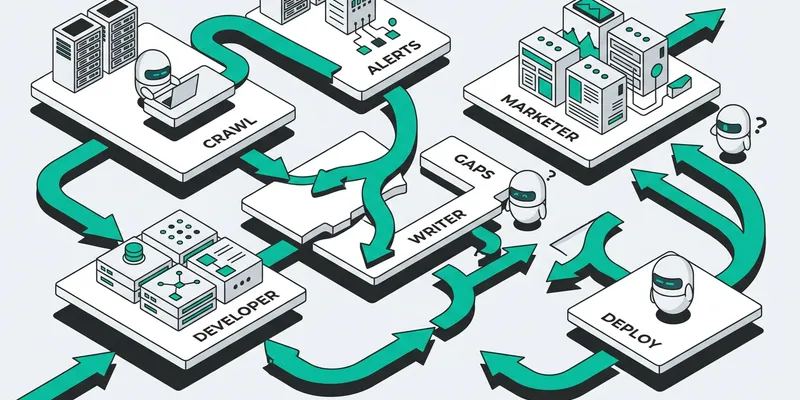
In most stacks, “automation” still means alerts, scheduled crawls, and dashboards. Useful, but incomplete. If your system finds missing meta descriptions and then waits for a marketer, a writer, and a developer to coordinate the fix, nothing has been automated except the discovery.
Real SEO automation for WordPress executes inside the operating layer of the site. It identifies issues, decides what should change, writes or rewrites the asset, and publishes the update into WordPress as a native change. The distinction matters. Native writes persist. JavaScript overlays and front-end patches do not solve the underlying CMS problem.
For serious teams, the bar is higher than “saves a few clicks.” Automation should reduce backlog, increase publishing velocity, and improve coverage across the parts of the site that humans neglect first - long-tail pages, aging blog content, low-priority category pages, and repetitive technical hygiene.
Why WordPress is fertile ground for automation
"WordPress teams drown in SEO audits while their sites slowly bleed traffic - the gap between knowing and doing is where most SEO strategies die."
— Joakim Thörn, Founder, effectly.ai
WordPress is flexible, which is another way of saying it accumulates entropy fast.
Plugins overlap. Theme logic creates template inconsistencies. Editorial teams publish quickly, but maintenance is uneven. One author follows a structure. Another ignores it. One plugin handles schema. Another overrides it. Then a redesign ships, internal links get stripped, and nobody notices until traffic drops.
That makes WordPress ideal for automation because the platform contains a large volume of repeatable SEO work. Template-level issues can be detected and corrected systematically. Content updates can be generated against defined page types. Publishing actions can happen without dragging engineering into every ticket.
The trade-off is control. WordPress is easy to change, which means bad automation can create sitewide mistakes quickly. The answer is not avoiding automation. It is using systems with approval rules, audit logs, rollback paths, and publishing controls that respect production environments.
The tasks worth automating first
Content optimization at scale represents the next frontier for automated SEO platforms, particularly when addressing technical debt that accumulates faster than teams can resolve it. While basic SEO automation tools handle surface-level improvements, enterprise SEO platforms must tackle structural issues like URL canonicalization, redirect chain resolution, and Core Web Vitals optimization that directly impact rankings but require development resources to implement manually.
"WordPress REST API gives third-party tools everything they need without touching the admin panel."
— WordPress Developer Documentation (2025)
Smart SEO automation platforms prioritize tasks that eliminate bottlenecks between analysis and action. Schema markup deployment, internal linking optimization, and image alt-text generation represent the sweet spot—high-impact changes that manual processes often delay or skip entirely. Unlike traditional SEO tools for agencies that flag issues without resolution, automated SEO optimization should target the repetitive technical work that prevents your content from reaching its organic potential.
This structural complexity means that effective SEO automation software must understand WordPress's template and plugin ecosystem before making changes. Intelligent automation platforms parse your post types, custom fields, and permalink rules to determine the correct optimization path. The difference between a failed deployment and successful automated SEO optimization often comes down to whether your technical SEO tools can map WordPress entities to rendered HTML without breaking editor workflows.
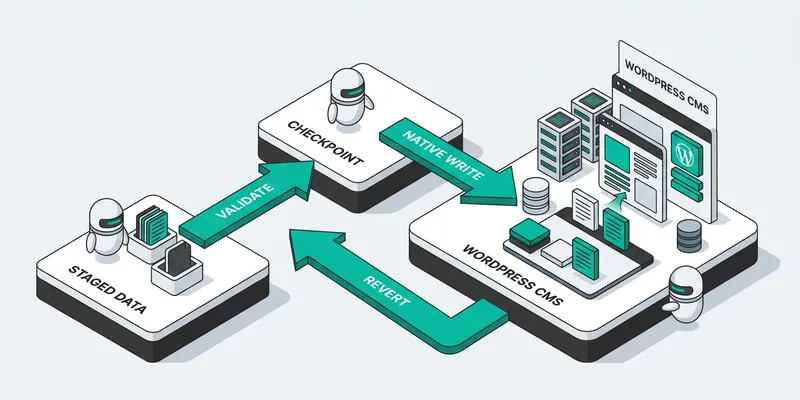
Not every SEO task belongs on autopilot. Strategy still needs a point of view. But a large share of operational SEO in WordPress is repetitive enough to automate safely.
Metadata generation is the obvious starting point, but it is also the least interesting. If your automation stops at titles and descriptions, you are still running a manual SEO program with better formatting.
Higher-value automation covers content refreshes, internal linking, schema implementation, image alt text normalization, indexation clean-up, and template corrections across posts, collections, and landing pages. For content-heavy sites, programmatic updates to aging pages often produce more value than creating another net-new article nobody has time to maintain.
There is also a technical layer. Canonical inconsistencies, redirect hygiene, heading structure, orphaned pages, and thin archive pages are common WordPress failures. These should not require a six-week sprint planning cycle.
The key principle is simple: automate the work that is high-volume, rule-governed, and expensive to coordinate manually.
Where most WordPress SEO automation breaks down
"The best SEO automation doesn't ask for your approval to fix duplicate titles or strengthen internal links, it just ships the changes while you sleep."
— Joakim Thörn, Founder, effectly.ai
The market is full of tools that automate fragments.
One class of products audits the site and stops there. Another generates copy but does not understand page intent, template context, or publishing constraints. A third injects changes on the front end instead of writing them into the CMS. All three create motion. None closes the loop.
This is where teams get burned. They buy “automation” and end up with a new queue to manage. Someone still has to export issues, assign fixes, review drafts, chase approvals, and publish changes. The labor moved. It did not disappear.
There is also a quality problem. WordPress sites are rarely homogeneous. An ecommerce category page, a SaaS feature page, and a blog article should not be treated by the same generic ruleset. Automation without audience context creates generic outputs at scale. That is worse than manual inconsistency because it spreads mediocrity everywhere at once.
If the system cannot distinguish between page types, business priorities, and user intent, it is not automating SEO. It is bulk editing.
How to evaluate SEO automation for WordPress
Consider the operational efficiency gains when evaluating an automated SEO platform against traditional manual workflows. The best SEO automation software should demonstrate measurable time-to-implementation metrics, showing how quickly critical issues like missing meta descriptions, broken internal links, or schema markup gaps get resolved across your entire WordPress site. Look for platforms that provide clear before-and-after comparisons of their automated SEO optimization work, including documentation of native code changes rather than temporary overlays that vanish when contracts end.
When comparing WordPress SEO automation solutions, prioritize platforms that offer comprehensive technical SEO tools integrated directly into your content management system. The most effective SEO automation tools should provide granular control over implementation timing, allowing you to review changes before they go live while maintaining the ability to execute at scale.
When evaluating SEO automation software, the architecture of implementation becomes critical for long-term success. 200+ ranking signals are evaluated by the Constitution Agent before any write ships according to effectly.ai product documentation (2026).

Start with the write path.
If a platform cannot make permanent, native changes in WordPress, it is not solving the operational problem. Front-end injection is fragile. If you cancel the tool and the changes disappear, you were renting a visual layer, not fixing your site.
Next, check whether the platform executes beyond recommendations. Does it only surface issues, or does it actually rewrite pages, update metadata, add links, and publish? Execution is the dividing line between software that helps your team think and software that helps your site grow.
Then inspect controls. Serious automation needs review states, logging, and clear records of what changed, where, and why. For teams with compliance or brand constraints, that is not optional. The right system behaves like disciplined infrastructure, not a content spinner with admin access.
Finally, look at fit with your actual operating model. If your team runs WordPress with custom fields, editorial workflows, staging environments, or Git-based deployment, the automation should adapt to that stack. You should not have to redesign operations around a tool.
The difference between assistive tools and autonomous execution
Assistive tools make specialists faster. Autonomous systems remove work from specialists entirely.
That distinction is not semantic. It determines whether SEO scales with headcount or with infrastructure. An assistive tool still depends on your team to translate findings into actions. An autonomous system handles the chain end-to-end: diagnosis, prioritization, content generation, technical remediation, and publishing.
For a stretched SEO manager, this is the whole point. They do not need another source of truth. They need throughput.
That is why platforms like Effectly.ai are built around execution rather than observation. The model is straightforward: assess what is broken, understand the audience and page context, write the fix, and publish native changes directly into the CMS. No JavaScript layer. No permanent dependency to keep fixes alive. The work ships, and it stays shipped.
When automation should not be fully hands-off
There are cases where full autonomy is the wrong choice.
If your brand has strict editorial review, legal requirements, or highly sensitive product claims, approval gates should stay in place. If your site architecture is being redesigned, broad automated changes may need temporary limits until templates stabilize. If your taxonomy is already compromised, automating internal links before cleaning up structure can amplify the wrong signals.
This is the practical version of “it depends.” Good automation does not mean zero oversight. It means human attention is reserved for high-leverage decisions instead of repetitive execution.
For many teams, the best rollout starts with bounded domains: blog refreshes, metadata normalization, internal linking on editorial content, or technical fixes on a subset of templates. Once output quality and governance are proven, expansion is easy.
What the payoff looks like
The benefit is not fewer tools. The benefit is organic growth that stops depending on coordination across people who are already overloaded.
Effective automation fixes technical debt faster and keeps aging content from rotting in place — because the gap between opportunity and action shrinks.
Honest challenge: if your backlog is full and your shipped-fix history is thin, the fix is not a new plugin — it is merge throughput and governance.
FAQ
What is SEO automation for WordPress?
SEO automation for WordPress is technology that implements SEO changes natively in your database, theme, and posts through supported APIs—not just scores in a plugin. effectly.ai treats that path as execution with approvals and logs, not another export queue for your content team.
How does WordPress SEO automation work?
It connects to your WordPress environment, analyzes templates and content, then writes native changes to metadata, links, schema, and technical settings instead of handing tasks back to developers as tickets.
Can SEO automation replace manual WordPress optimization?
It can replace repetitive, rule-based execution at scale, while strategy and sensitive pages still need human judgment. effectly.ai is designed to remove the backlog between diagnosis and published changes—not to eliminate editorial oversight.
What WordPress SEO tasks should be automated first?
Prioritize title and description coverage on templates, internal linking between related posts, schema where templates allow it, and technical hygiene like redirects and canonicals—high impact with clear guardrails.
Is free SEO automation available for WordPress?
Some plugins automate fragments, but comprehensive automation that writes natively across enterprise sites usually requires a dedicated execution platform; free tools often stop at reporting.
Will SEO automation break my WordPress plugins?
Well-scoped automation uses editor-level APIs and avoids plugin conflicts by writing through supported surfaces. Always stage high-risk templates first.
Can I run WordPress SEO automation on WooCommerce only?
Yes—scope can limit to product and collection post types so blog and legal pages stay untouched until you expand coverage.
Does effectly.ai replace my SEO crawler or rank tracker?
Usually not—many teams keep crawlers and rank trackers for discovery while using effectly.ai for native technical writes. Canceling research tools only makes sense when discovery is staffed and execution remains the bottleneck.